

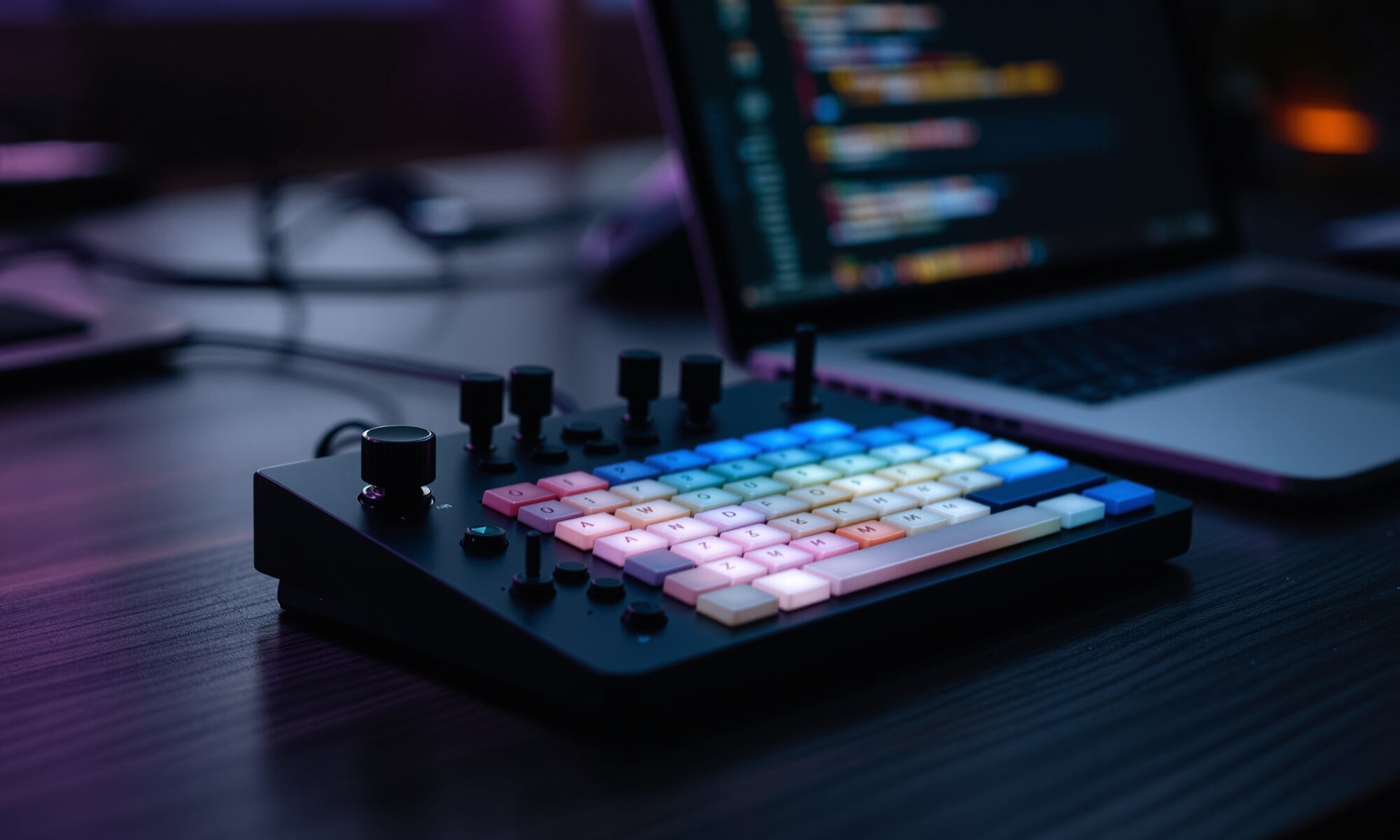
The Codex Micro keyboard is a $230 limited-edition AI coding keypad from OpenAI and Work Louder, built to monitor and control Codex agents from your desk. Orders opened on July 15, 2026, and OpenAI’s Supply Co. page listed it as sold out by July 17. It’s not a full keyboard. It’s a compact control pad for developers already using Codex heavily.
Codex Micro keyboard: what OpenAI is actually selling
OpenAI’s first widely discussed hardware product is surprisingly small: a desktop macropad, not a laptop, phone, or wearable. The company lists the model as kbd-1.0-codex-micro, designed with Work Louder, a maker known for compact creator keyboards and productivity controllers.
The Codex Micro keyboard costs USD $230 in 2026, according to OpenAI’s official Supply Co. page. Axios reported that orders opened on Wednesday, July 15, 2026, and the product was available only until it sold out. OpenAI’s page, crawled on July 17, showed it as “Agotado,” Spanish for sold out.
Its job is narrow. You use it to see what Codex coding agents are doing and to send common commands without hunting through browser tabs, IDE panels, or chat windows. If you’re casually asking an AI model for a regex once a week, this is overkill. If you’re running several coding agents during the day, the idea starts to make more sense.
The bigger story is that OpenAI chose a physical interface for agentic software. That matters. As coding tools move from autocomplete toward autonomous task execution, the bottleneck becomes supervision: accepting changes, catching errors, answering questions, and knowing when a bot is stuck. That’s the same pressure showing up across fast-moving software development and security workflows, where speed is useful only if control doesn’t vanish.
Specs, controls, and what each part does
Officially, the Codex Micro keyboard supports Bluetooth and USB-C, works with Mac and Windows, and includes RGB lighting. The control surface has 13 mechanical switches, one touch sensor, one rotary encoder, and one planar joystick. The package includes a Creator Micro, a USB-C to USB-C cable, and Codex icon keycaps; OpenAI’s page also says it includes 32 additional keycaps.
Work Louder says the Agent Keys show task states such as idle, thinking, complete, needs input, and error. Tom’s Hardware reported on July 16, 2026, that the top row uses six translucent keys with integrated LEDs and perimeter lighting, with colors including white for idle, green for unread chat, blue for thinking, peach for a question, and red for an error.
Those lights are the part I find most persuasive. A status LED is not glamorous, but it can save you from constantly checking a screen. Anyone who has bounced between pull requests, terminal output, Slack, and an AI assistant knows the tax: tiny interruptions, repeated context switching, and missed prompts.
Command Keys can accept changes, reject outputs, start new chats, trigger push-to-talk, and run custom actions, according to Work Louder. OpenAI says the joystick can launch common Codex workflows such as reviewing a pull request, debugging an error, or refactoring code.
| Feature | Official 2026 detail | Why it matters |
|---|---|---|
| Price | USD $230 | Places it closer to premium macropads than casual accessories |
| Connectivity | Bluetooth and USB-C | Useful for desk setups that move between wired and wireless modes |
| Compatibility | Mac and Windows | Covers the main developer desktop platforms |
| Controls | 13 mechanical switches, 1 touch sensor, 1 rotary encoder, 1 planar joystick | Gives you shortcuts, navigation, and agent commands in one small device |
| Agent states | Idle, thinking, complete, needs input, error | Makes background AI work visible without opening the Codex interface |
| Included items | Creator Micro, USB-C to USB-C cable, Codex icon keycap set, plus 32 additional keycaps | Suggests customization beyond the default Codex layout |
Why would an AI coding tool need a physical keypad?
The obvious counter-argument is fair: software should not need a $230 gadget to be manageable. Keyboard shortcuts, IDE plug-ins, notifications, and command palettes already exist. A good Codex interface should work without extra hardware.
Still, agentic coding creates a different rhythm from ordinary coding. You’re not only typing. You’re assigning tasks, checking proposals, accepting diffs, rejecting bad output, and deciding when an agent should keep going. A compact console can reduce the friction of that supervision, especially if you keep multiple agent tasks running in parallel.
Here’s a concrete way to think about the price. If the Codex Micro keyboard saves you five minutes per workday by reducing tab checks and repeated prompt handling, that’s about 21.7 hours over a 260-day work year. At a $75 hourly loaded developer cost in 2026, the theoretical saved time is around $1,625 per year. Cut that estimate in half for optimism and interruptions that would have happened anyway, and the device still clears its $230 price.
Of course, the math collapses if you don’t use Codex daily. A hobbyist who runs one AI coding task on weekends might save ten minutes a week, or roughly 8.7 hours a year. At that usage level, you’re buying a collectible or a desk toy. No shame in that, but call it what it is.
The less discussed pitfall is alert fatigue. If every agent state change gets a light, color, or command temptation, your desk becomes another notification surface. For teams already wrestling with AI tools, token budgets, and automation overhead, the same discipline behind token minimization for AI teams applies here too: fewer signals, better signals.
How it compares with ordinary macropads
Tom’s Hardware reported that Codex Micro is built on Work Louder’s existing Creator Micro 2 platform. That detail matters because it frames the product less as a brand-new hardware category and more as a specialized version of a proven creator keypad. OpenAI is adding the Codex-specific concept, icons, and agent workflow mapping.
Compared with a generic macropad, the Codex Micro keyboard is more opinionated. A normal programmable pad can trigger shortcuts in Visual Studio Code, JetBrains IDEs, GitHub Desktop, a terminal, or your browser. This one is clearly aimed at Codex agent control, with task-state keys and command labels that make sense only if you live inside that workflow.
That specialization is both the sell and the risk. I like single-purpose tools when they remove mental clutter. But paying premium money for a device tied to one AI workflow can age badly if your team later switches to Claude Code, Cursor, GitHub Copilot agents, or another toolchain.
There’s also a procurement wrinkle nobody likes to mention: keyboards are personal, but AI governance is organizational. If a company allows Codex agents only in approved repositories or restricted environments, a desk controller doesn’t change those rules. Teams should document what commands are safe, who may accept generated changes, and when human review is mandatory; clear workflow notes are boring, but good process documentation can prevent expensive confusion.
Who should buy it, if it comes back?
Because OpenAI’s official page showed the Codex Micro keyboard as sold out on July 17, 2026, the practical buying advice starts with patience. Don’t pay a silly resale markup unless you’re collecting OpenAI hardware. Scarcity is doing part of the marketing work here.
For actual use, the strongest buyers are developers, engineering managers, and technical founders who already run Codex agents as part of daily work. The product is also plausible for reviewers, demo teams, and AI labs that want a visible way to monitor coding agents during presentations.
Use these criteria before spending $230 or chasing a restock:
- You use Codex agents several times per day, not occasionally.
- You often wait for agent responses while doing other work.
- You accept or reject AI-generated code changes frequently enough that hardware buttons would reduce friction.
- You’re comfortable tying part of your desk setup to OpenAI’s Codex workflow.
- Your organization permits agentic coding and has review rules for generated code.
A quieter edge case: shared workstations. In a lab, classroom, or team bench setup, a visible agent-status controller could help multiple people understand what Codex is doing. On a single developer’s desk, the value depends more on habit. If you ignore desk gadgets after the first week, this one won’t magically become different.
Switch choice may matter too. Tom’s Hardware reported that buyers could choose clicky or silent switches. For a home office, either could work. In an open office, honestly, clicky switches on an AI command pad are asking for social trouble.
Availability, price pressure, and the sold-out problem
Limited-edition hardware always creates a distorted first impression. OpenAI’s Supply Co. page listed the product at $230 and sold out, while Axios described it as available only until supply ran out. That tells you demand exceeded the initial batch, but it doesn’t tell you whether demand was huge, supply was tiny, or both.
The price is high enough to invite comparison with premium mechanical accessories, yet low enough for professional developers to expense without a long debate. That’s probably intentional. At $230, the Codex Micro keyboard sits in the “serious desk tool” category, not the mass-market peripheral aisle.
Resale pricing will be the messy part if OpenAI doesn’t restock quickly. A limited first hardware product from OpenAI has collector appeal beyond its utility, especially because Tom’s Hardware described it as OpenAI’s first hardware device. If secondary-market prices drift far above retail, the productivity argument weakens fast.
For readers tracking agent interfaces more broadly, this keypad fits the same pattern as browser agents and AI assistants moving from chat boxes into task systems. If you’re comparing software-first options, our guide to AI browser agents in 2026 is a useful counterpoint: it shows how much can be done without dedicated hardware.
The real significance: AI agents are getting dashboards
The Codex Micro keyboard is easy to dismiss as branded desk candy. Some of that is fair. It has RGB lighting, icon keycaps, and limited-edition energy. The product practically invites photos on developer desks.
Underneath the merch vibe, though, there’s a serious interface question: how should you supervise software that acts semi-independently? A chat window is fine for one request. It’s clumsy for a queue of background tasks that can succeed, fail, ask questions, or produce code that needs review.
Physical controls have survived in creative work for a reason. Video editors use jog wheels. Streamers use macro decks. Audio engineers like knobs because they can operate them without staring. Coding with agents may be heading toward the same split between screen work and tactile control.
Security will decide whether that split is healthy. Accepting AI-generated diffs from a hardware key sounds efficient, but it also shortens the distance between suggestion and production code. For sensitive projects, you’ll want review gates, repository protections, and audit trails before treating a glowing green key as permission to ship.
My read: the Codex Micro keyboard is not a must-buy computer accessory. It’s a first draft of an AI agent console. The interesting part isn’t that OpenAI made a small keyboard; it’s that agent work has become concrete enough to deserve buttons, lights, and a joystick.
FAQ
What is the Codex Micro keyboard?
The Codex Micro keyboard is a limited-edition desktop keypad from OpenAI and Work Louder for monitoring and controlling Codex coding agents. It has mechanical keys, RGB lighting, a rotary encoder, a touch sensor, and a planar joystick.
How much does the Codex Micro keyboard cost?
OpenAI’s official Supply Co. page listed the Codex Micro keyboard at USD $230 in 2026. The same page showed it as sold out when crawled on July 17, 2026.
Does Codex Micro work with Windows and Mac?
Yes. OpenAI’s 2026 specifications list Mac and Windows compatibility, with Bluetooth and USB-C connection options.
Can you use Codex Micro as a normal macropad?
OpenAI and Work Louder describe it around Codex agent workflows, but the package includes additional keycaps and Work Louder’s platform is associated with programmable creator keypads. Treat general macropad use as secondary unless the maker documents your exact setup.
Is the Codex Micro keyboard worth buying?
It’s most defensible if you use Codex agents daily and want physical controls for accepting changes, rejecting outputs, and monitoring task states. If your AI coding use is occasional, $230 is hard to justify on productivity alone.