

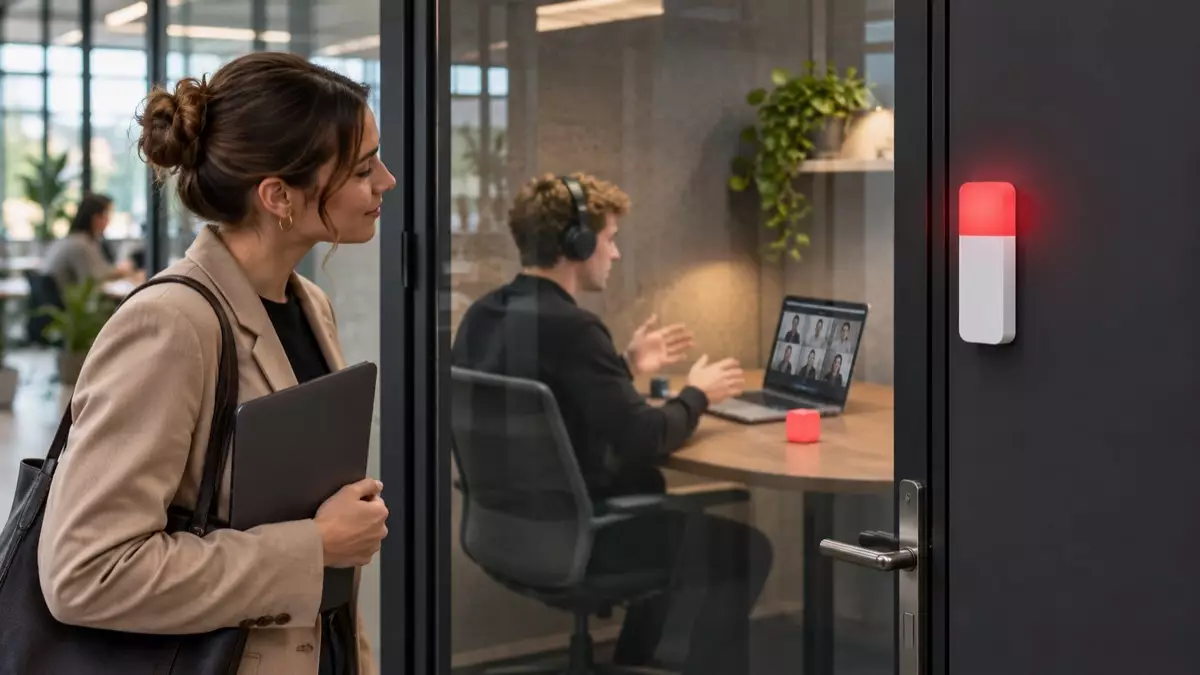
A busy icon is useful only to people looking at the screen. Coworkers in the office cannot see it, and someone outside a meeting room may not know whether the space is free. A visible signal closes that gap.
A color near a desk or door shows availability before anyone asks. People can approach, wait, or use another room without interrupting work in progress.
The Impact of Workplace Interruptions on Productivity
Even a short question can pull an employee from a complex task and force them to rebuild the context afterward. Repeated interruptions make the day feel busy while important work moves slowly.
In shared spaces, opening an occupied room distracts everyone inside. A colleague who walks there only to find it unavailable also loses time.
Typical Distractions for Desk-Based Employees
Desk workers appear approachable even when they are presenting, analyzing data, or handling a sensitive call. Headphones reduce noise but do not explain what the person is doing.
Frequent sources of distraction include:
- walk-up questions during focused work;
- conversations started while someone is on a call;
- people checking rooms that are already occupied;
- repeated messages asking whether a desk or space is free.
The problem is missing context. A reliable status helps employees choose a less disruptive time or communication method.
How Visual Availability Signals Improve Team Communication
A visual signal communicates without demanding attention. Red can mean busy, green can mark availability, and another color may show a reservation. The team must agree on each meaning.
It also makes boundaries less personal. The employee need not turn away a colleague or explain the need for quiet. A later green signal shows that conversation is welcome again.
Staying Focused With Computer Busy Indicators
Computer statuses become more useful when visible beyond the display. A desk light may follow an online presence status, while a shared room may need an indicator outside and a control inside.
A room occupancy indicator light helps when booking software does not reflect real-time use. People see the color before walking in, while those inside avoid an unnecessary knock.
Practical Ways to Use Busy Signals at Work
Luxafor Switch Pro 2 suits meeting rooms, studios, clinics, and coworking spaces. Its indicator mounts outside, while Cube 2 stays inside as the control. Rotating the cube changes both units through automatic wireless pairing, with no app or computer.
Teams can introduce the system with a short set of rules:
- Use green only when the space is genuinely available.
- Switch to red as soon as a meeting or private task begins.
- Select another agreed color for reserved or temporary states.
- Place the outer indicator where it is visible from the corridor.
- Assign responsibility for resetting the status after use.
The connection works at up to 80 meters. Both pieces are rechargeable and magnetically mounted, so installation needs no permanent alterations or IT project.
Coordinating Availability in Hybrid and Remote Teams
Hybrid offices need two status layers. Online colleagues need accurate calendar information, while people on site need a visible signal. The room indicator covers the physical space, but users should still update the digital status.
Users should change the indicator on entry and reset it when leaving. Otherwise, coworkers stop trusting the color and it becomes background decoration.
How to Pick the Right Workplace Status Indicator
Start with the location. A desk light suits calls and individual focus. A two-part wireless system suits a room where the signal stays outside and the control remains inside.
Switch Pro 2 offers app-free controls, rechargeable components, four colors, and a long wireless range. Luxafor designs, manufactures, and tests its office tools in the EU and offers solutions for individual workstations and shared spaces. A company can use one visual language across the office.
Conclusion: Building a More Focused, Productive Workday
Office distractions often begin because someone lacks information about a person or room. When colors have clear meanings and stay current, fewer conversations and room checks interrupt focused work. Luxafor Switch Pro 2 brings that approach to shared spaces with simple controls and no software setup.